Guide
Connect Your HRIS to Google Workspace Without New Hires Getting Login Emails Too Early

Updated: Nov 20, 2026
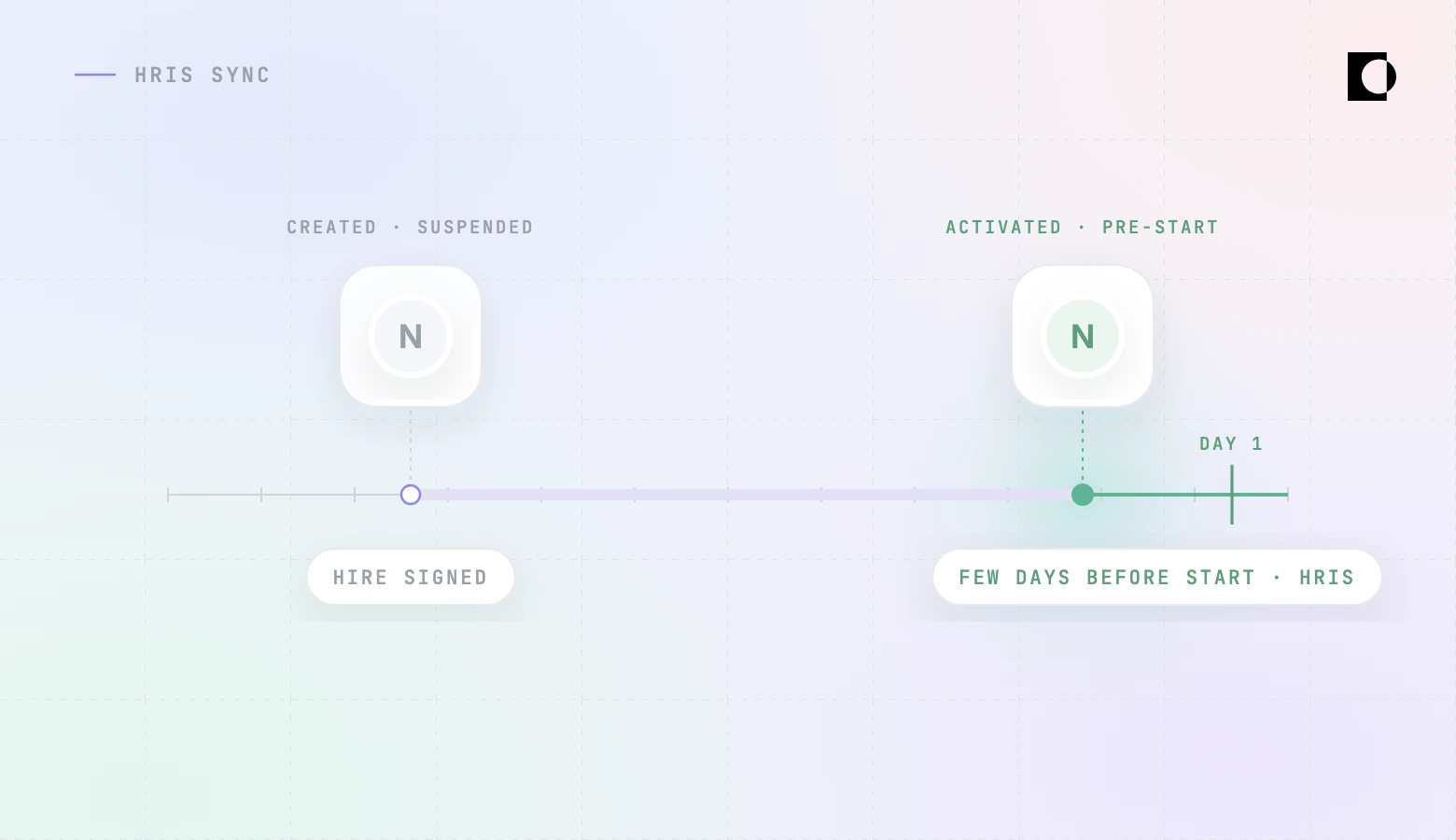
To connect your HRIS to Google Workspace without a new hire welcome email arriving weeks before day one, you need to separate two events that many setups treat as one: creating the account and activating it. Let the HRIS create the Google account once the hire is confirmed. Keep that account suspended or restricted. Then switch it on a few business days before the start date, using the start date field in the HRIS as the trigger.
ShiftControl is an IT operations platform made for Google Workspace, and it handles this pattern for HRIS-connected teams. Its founders scaled IT at ExpressVPN from 100 to 700+ employees across 7 global offices.
TL;DR
- Early login emails happen when account creation and activation fire at the same moment.
- Create the account early and activate it late, with the HRIS start date deciding when access goes live.
- Hold pending accounts in a suspended state or a restricted organizational unit.
- Apply the same logic to role changes and exits, so the HRIS drives identity lifecycle management from start to finish.
- Log every access change against a person or rule so you can show an auditor what happened.
About the Author: This guide comes from the ShiftControl team. They are operators who ran IT through rapid global growth at ExpressVPN and now build employee onboarding automation for companies that run on Google Workspace without needing a dedicated IT team.
Why do new hires get Google Workspace login emails too early?
Early login emails usually come from one cause: the sync that creates the account also makes it usable straight away. When HR marks a candidate as hired, an integration may push the record to Google immediately. If sign-in details go to the personal email on file at that point, the person can open company mail, calendars and shared drives before their contract begins.
There are three common ways this happens:
- Creation equals activation. The account is created in an active state on the day the offer is signed.
- Manual credential sharing. An admin creates the user and sends sign-in instructions right away to avoid a day-one scramble.
- Batch-based connectors. Some HRIS-to-Google connectors sync on a schedule rather than the moment a record changes, which makes precise timing harder to control.
Early access matters because it breaks the principle of least privilege. Picture an offer that falls through after the account went live. You now have an active account belonging to a non-employee, which is exactly the kind of finding that causes problems in a SOC 2 access-control review.
What is the right timing for creating versus activating an account?
Building on that cause, the fix is to manage the account the way a hotel manages key cards. The hotel assigns your room when you book, but it only encodes the card to open the door when you check in. A suspended Google account can work the same way. The name, department and groups are prepared in advance, and the account stays locked until the start date approaches.
Activating too late causes its own problems:
- Google notes it can take up to 24 hours for Google services to become available after a user is added.
- A new hire may also need time to sort out sign-in issues on a freshly created account.
Activating at 9 a.m. on day one leaves no buffer for either issue. Common IT practice is to activate a few business days before the start date.
| Stage | Trigger | Google account state | Can the hire sign in? |
|---|---|---|---|
| Offer accepted | Hire record created in HRIS | Created, suspended or in a restricted OU | No if suspended; a restricted OU limits services, not sign-in |
| Pre-start window | A few business days before the HRIS start date | Activated, groups applied | Yes |
| Day one | Start date | Fully provisioned, app tasks complete | Yes |
| Role change | Department, title or location updated in HRIS | Groups updated | Yes |
| Exit | HRIS termination date | Suspended, groups and apps removed | No |
How do you connect an HRIS to Google Workspace without triggering early access?
With the timing settled, the practical setup has two triggers. The hire date only creates the account, and the start date is what activates it. Follow these steps:
- Clean the HRIS fields Google needs. Check legal name, work email format, department, title, location, start date and manager. Bad data here turns into wrong access later.
- Choose a holding state. Either create accounts suspended to block sign-in, or place them in an organizational unit with core services turned off to restrict service access without blocking sign-in.
- Map groups to HRIS attributes. Let department, location and role decide group membership, so access is ready the moment the account goes live.
- Set the activation offset. Decide how many business days before the start date the account activates. Confirm that no welcome or credential email can fire before then.
- Deliver credentials on activation. Send sign-in details only when the account goes live, so the hire works from their business address from the first day. Work accounts should be prioritized over personal ones for business use.
- Assign non-Google apps. Give every app without automated provisioning an owner and a task, or it will be forgotten.
- Test with a dummy hire. Run a fake record through hire, start, role change and termination before trusting the flow with a real person.
A dedicated tool can handle this step. ShiftControl connects HRIS systems including HiBob, BambooHR, Omni HR, Deel, Shapes, Gusto, Rippling and Humaans. It creates the Google account with department, title and location filled in, then activates it a few days before the start date with no early welcome email. Apps outside Google become a task for their owner.
“Onboarding a new employee was seamless. ShiftControl made it feel like we had the same capabilities as a large enterprise, without the complexity.” Gene Yu, Founder and CEO of Blackpanda
How does the joiner mover leaver process change when the HRIS drives it?
Once the start date controls joiners, the same principle should run the whole joiner mover leaver process. Every change is made once, in the HRIS, and Google follows.
- Joiners: The account is created early and activated on schedule.
- Movers: A change to department, title or location updates groups the same day, so old access is removed when new access is added. Movers are where permission creep builds up, because people tend to gain access with each new role and rarely lose any.
- Leavers: The termination date suspends the account, groups and apps are removed, and paid licenses can be reclaimed.
Teams often focus their security effort on offboarding and treat onboarding as a convenience task. Yet early activation creates the same exposure as late offboarding, just at the other end of employment.
What should you check before turning on HRIS sync?
Stepping back from the mechanics, a separate question is whether your automation will stand up to scrutiny. Before you switch it on, check the following:
- Who can override activation dates, and is every override logged?
- Is every access change recorded with who or what made it? ShiftControl logs each change made through it, so you have evidence to show rather than relying on memory.
- Are accounts that were never activated, or are no longer used, flagged for review?
- Is 2-Step Verification enforced from the first sign-in?
- Does a withdrawn offer in the HRIS remove the pending account?
Frequently Asked Questions
Can I stop Google from sending a new hire welcome email too early? Yes. Admins control how sign-in details are shared, and they can suspend accounts to block sign-in or restrict service access by organizational unit. Linking activation to an HRIS start date requires a connected tool or a manual reminder.
How many days before the start date should an account be activated? A few business days is common practice. That window covers Google’s propagation time of up to 24 hours and leaves room to fix sign-in issues.
What is identity lifecycle management? Identity lifecycle management is the process of creating, changing and removing a person’s digital access as their employment status changes. It is usually organized around the joiner mover leaver process.
Is a SaaS management platform the same as an HRIS integration? They overlap but do different jobs. An HRIS integration moves people data into your directory. A SaaS management platform also tracks which apps people use, what those apps cost and what data third-party apps can reach.
Do I need an IT team for employee onboarding automation? No. Rules based on department, location and role handle the repetitive work, so an operator in People or Ops can own the process.
What happens if an offer is withdrawn? If the account was never activated, suspend or delete it. If it was activated early, review its sign-in and file access history before removing it.
About ShiftControl
ShiftControl is IT built for operators, not IT teams. It is made for Google Workspace and requires no dedicated IT hire. It brings four jobs into one platform: provisioning and access, SaaS spend management, app-permission visibility, and incident response. Cyber incident response via IR-1 from Blackpanda is included on annual Core and Enterprise plans.
ShiftControl reports that setup takes about 30 minutes through a single Google Workspace login. The company is SOC 2 compliant, ISO-aligned and a signer of the CISA Secure by Design Pledge, and it believes the security basics should not be locked behind expensive tiers.
To see start-date activation working with your own HRIS, try the live demo or start a free trial at https://shiftcontrol.io/.
References
- Add an account for a new user | User management | Google Workspace Help (knowledge.workspace.google.com)
- 5 tips for onboarding your first employees using G Suite (workspace.google.com)
Get started
Experience SaaS management as it should be: straightforward management and robust security with ShiftControl.
Start free trial